


Page 55 - CC2018_AI_Look_Inside
P. 55
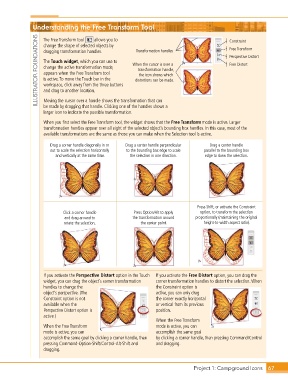
Understanding the Free Transform Tool                                            Constraint

                ILLUSTRATOR FOUNDATIONS  dragging transformation handles.   When the cursor is over a   Perspective Distort
                                        allows you to
                   The Free Transform tool

                   change the shape of selected objects by
                                                                                                Free Transform
                                                         Transformation handles
                   The Touch widget, which you can use to
                                                                                                Free Distort
                   change the active transformation mode,
                                                          transformation handle,
                   appears when the Free Transform tool
                                                          the icon shows which
                   is active. To move the Touch bar in the
                                                         distortions can be made.
                   workspace, click away from the three buttons
                   and drag to another location.
                   Moving the cursor over a handle shows the transformation that can
                   be made by dragging that handle. Clicking one of the handles shows a
                   larger icon to indicate the possible transformation.

                   When you first select the Free Transform tool, the widget shows that the Free Transform mode is active. Larger
                   transformation handles appear over all eight of the selected object’s bounding box handles. In this case, most of the
                   available transformations are the same as those you can make when the Selection tool is active.

                      Drag a corner handle diagonally in or   Drag a center handle perpendicular   Drag a center handle
                      out to scale the selection horizontally   to the bounding box edge to scale   parallel to the bounding box
                        and vertically at the same time.  the selection in one direction.  edge to skew the selection.


                                                                                  Press Shift, or activate the Constraint
                           Click a corner handle        Press Option/Alt to apply   option, to transform the selection
                            and drag around to          the transformation around   proportionally (maintaining the original
                           rotate the selection.           the center point.         height-to-width aspect ratio).


                   If you activate the Perspective Distort option in the Touch   If you activate the Free Distort option, you can drag the
                   widget, you can drag the object’s corner transformation   corner transformation handles to distort the selection. When
                   handles to change the                         the Constraint option is
                   object’s perspective. (The                    active, you can only drag
                   Constraint option is not                      the corner exactly horizontal
                   available when the                            or vertical from its previous
                   Perspective Distort option is                 position.
                   active.)
                                                                 When the Free Transform
                   When the Free Transform                       mode is active, you can
                   mode is active, you can                       accomplish the same goal
                   accomplish the same goal by clicking a corner handle, then   by clicking a corner handle, then pressing Command/Control
                   pressing Command-Option-Shift/Control-Alt-Shift and   and dragging.
                   dragging.


                                                                                 Project 1: Campground Icons    67

