


Page 66 - CC2017_AI_Look_Inside
P. 66
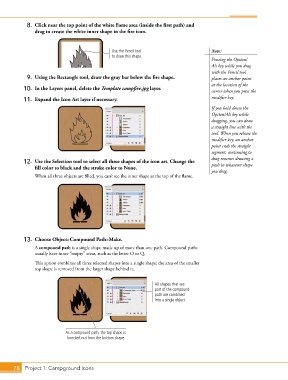
8.  Click near the top point of the white flame area (inside the first path) and
               drag to create the white inner shape in the fire icon.


                                               Use the Pencil tool                      Note:
                                               to draw this shape.
                                                                                        Pressing the Option/
                                                                                        Alt key while you drag
                                                                                        with the Pencil tool
            9.  Using the Rectangle tool, draw the gray bar below the fire shape.       places an anchor point
                                                                                        at the location of the
           10.  In the Layers panel, delete the Template campfire.jpg layer.            cursor when you press the

           11.  Expand the Icon Art layer if necessary.                                 modifier key.
                                                                                        If you hold down the
                                                                                        Option/Alt key while
                                                                                        dragging, you can draw
                                                                                        a straight line with the
                                                                                        tool. When you release the
                                                                                        modifier key, an anchor
                                                                                        point ends the straight
                                                                                        segment; continuing to
                                                                                        drag resumes drawing a
           12.  Use the Selection tool to select all three shapes of the icon art. Change the   path in whatever shape
               fill color to black and the stroke color to None.
                                                                                        you drag.
               When all three objects are filled, you can’t see the inner shape at the top of the flame.


           13.  Choose Object>Compound Path>Make.
               A compound path is a single shape made up of more than one path. Compound paths
               usually have inner “empty” areas, such as the letter O or Q.

               This option combines all three selected shapes into a single shape; the area of the smaller
               top shape is removed from the larger shape behind it.


                                                                 All shapes that are
                                                                 part of the compound
                                                                 path are combined
                                                                 into a single object.


                            As a compound path, the top shape is
                             knocked out from the bottom shape.


       78 Project 1: Campground Icons

