


Page 37 - CS6_GD_Look_Inside.pdf
P. 37
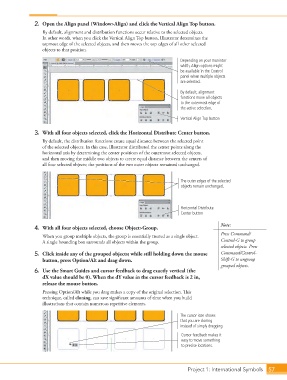
2.  Open the Align panel (Window>Align) and click the Vertical Align Top button.
                        By default, alignment and distribution functions occur relative to the selected objects.
                        In other words, when you click the Vertical Align Top button, Illustrator determines the
                        topmost edge of the selected objects, and then moves the top edges of all other selected
                        objects to that position.

                                                                                Depending on your monintor
                                                                                width, Align options might
                                                                                be available in the Control
                                                                                panel when multiple objects
                                                                                are selected.
                                                                                By default, alignment
                                                                                functions move all objects
                                                                                to the outermost edge of
                                                                                the active selection.

                                                                                Vertical Align Top button

                    3.  With all four objects selected, click the Horizontal Distribute Center button.

                        By default, the distribution functions create equal distance between the selected point
                        of the selected objects. In this case, Illustrator distributed the center points along the
                        horizontal axis by determining the center positions of the outermost selected objects,
                        and then moving the middle two objects to create equal distance between the centers of
                        all four selected objects; the positions of the two outer objects remained unchanged.


                                                                                The outer edges of the selected
                                                                                objects remain unchanged.


                                                                                Horizontal Distribute
                                                                                Center button

                                                                                                 Note:
                    4.  With all four objects selected, choose Object>Group.
                                                                                                 Press Command/
                        When you group multiple objects, the group is essentially treated as a single object.
                        A single bounding box surrounds all objects within the group.            Control-G to group
                                                                                                 selected objects. Press
                    5.  Click inside any of the grouped objects; while still holding down the mouse   Command/Control-
                        button, press Option/Alt and drag down.                                  Shift-G to ungroup
                                                                                                 grouped objects.
                    6.  Use the Smart Guides and cursor feedback to drag exactly vertical (the
                        dX value should be 0). When the dY value in the cursor feedback is 2 in,
                        release the mouse button.
                        Pressing Option/Alt while you drag makes a copy of the original selection. This
                        technique, called cloning, can save significant amounts of time when you build
                        illustrations that contain numerous repetitive elements.

                                                                                The cursor icon shows
                                                                                that you are cloning
                                                                                instead of simply dragging.
                                                                                 Cursor feedback makes it
                                                                                 easy to move something
                                                                                 to precise locations.


                                                                                   Project 1: International Symbols  57

