


Page 30 - CS6_GD_Look_Inside.pdf
P. 30
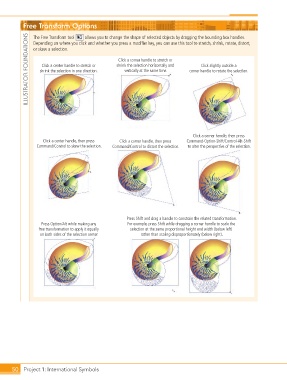
Free Transform Options

                  ILLUSTRATOR FOUNDATIONS  or skew a selection.  shrink the selection horizontally and   corner handle to rotate the selection.
                                         allows you to change the shape of selected objects by dragging the bounding box handles.
                    The Free Transform tool

                    Depending on where you click and whether you press a modifier key, you can use this tool to stretch, shrink, rotate, distort,
                                                       Click a corner handle to stretch or
                        Click a center handle to stretch or
                                                                                         Click slightly outside a
                                                         vertically at the same time.
                       shrink the selection in one direction.


                                                                                     Click a corner handle, then press
                        Click a center handle, then press   Click a corner handle, then press   Command-Option-Shift/Control-Alt-Shift
                     Command/Control to skew the selection.  Command/Control to distort the selection.  to alter the perspective of the selection.


                                                          Press Shift and drag a handle to constrain the related transformation.
                       Press Option/Alt while making any   For example, press Shift while dragging a corner handle to scale the
                      free transformation to apply it equally   selection at the same proportional height and width (below left)
                       on both sides of the selection center.   rather than scaling disproportionately (below right).


           50 Project 1: International Symbols

