


Page 29 - CS6_GD_Look_Inside.pdf
P. 29
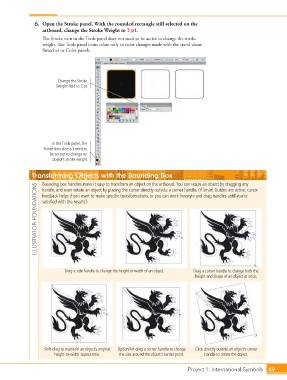
6.  Open the Stroke panel. With the rounded rectangle still selected on the
                        artboard, change the Stroke Weight to 3 pt.
                        The Stroke icon in the Tools panel does not need to be active to change the stroke
                        weight. The Tools panel icons relate only to color changes made with the stand-alone
                        Swatches or Color panels.


                              Change the Stroke
                             Weight field to 3 pt.


                            In the Tools panel, the
                        Stroke icon doesn’t need to
                           be on top to change an
                            object’s stroke weight.


                    Transforming Objects with the Bounding Box

                        Bounding box handles make it easy to transform an object on the artboard. You can resize an object by dragging any
                     ILLUSTRATOR FOUNDATIONS  satisfied with the results.)
                        handle, and even rotate an object by placing the cursor directly outside a corner handle. (If Smart Guides are active, cursor
                        feedback helps if you want to make specific transformations, or you can work freestyle and drag handles until you’re


                                 Drag a side handle to change the height or width of an object.  Drag a corner handle to change both the
                                                                                      height and shape of an object at once.


                        Shift-drag to maintain an object’s original   Option/Alt-drag a corner handle to change   Click directly outside an object’s corner
                             height-to-width aspect ratio.  the size around the object’s center point.  handle to rotate the object.


                                                                                   Project 1: International Symbols  49

