


Page 17 - CC2018_PS_Look_Inside
P. 17
Effective resolution can be a very important consideration when working with
              client-supplied images, especially those that come from consumer-level digital cameras.
              Many of those devices capture images with a specific number of pixels rather than
              a number of pixels per inch (ppi). In this exercise, you will explore the effective
              resolution of an image to see if it can be used for a full-page printed magazine ad.

                1.  Download Music_PS18_RF.zip from the Student Files web page.

                2.  Expand the ZIP archive in your WIP folder (Macintosh) or copy the archive
                   contents into your WIP folder (Windows).
                   This results in a folder named Music, which contains all of the files you need for this   Note:
                   project. You should also use this folder to save the files you create in this project.
                                                                                            We are intentionally
                   If necessary, refer to Page 1 of the Interface chapter for specific information on   overlooking issues of
                   expanding or accessing the required resource files.                      color space for the sake
                                                                                            of this project. You will
                3.  Choose File>Open and navigate to your WIP>Music folder.                 learn about color spaces
                   Select Sunrise.jpg and click Open.                                       and color management
                                                                                            in Project 3: Museum
                4.  If the rulers are not visible on the top and left edges, choose View>Rulers   Image Correction.
                   (or press Command/Control-R).
                   As you can see in the rulers, this image has a very large physical size.
                                                                                            Note:

                                                                                            You can change the
                                                                                            default unit of measure-

                                                                           Rulers display values   ment in the Units &
                                                                           in the default units   Rulers pane of the
                                                                           of measurement.  Preferences dialog box.
                                                                                            Double-clicking either
                                                                                            ruler opens the appropri-
                                                                                            ate pane of the Prefer-
                                                                                            ences dialog box.


                                                                                            Note:
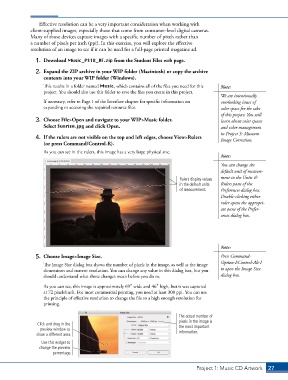
                5.  Choose Image>Image Size.                                                Press Command-
                   The Image Size dialog box shows the number of pixels in the image, as well as the image   Option-I/Control-Alt-I
                   dimensions and current resolution. You can change any value in this dialog box, but you   to open the Image Size
                   should understand what those changes mean before you do so.              dialog box.

                   As you can see, this image is approximately 69″ wide and 46″ high, but it was captured
                   at 72 pixels/inch. For most commercial printing, you need at least 300 ppi. You can use
                   the principle of effective resolution to change the file to a high enough resolution for
                   printing.

                                                                           The actual number of
                                                                           pixels in the image is
                Click and drag in the                                      the most important
                 preview window to                                         information.
                show a different area.
                  Use this widget to
                 change the preview
                       percentage.


                                                                                  Project 1: Music CD Artwork   27

