


Page 74 - Adobe Photoshop CC 2020
P. 74
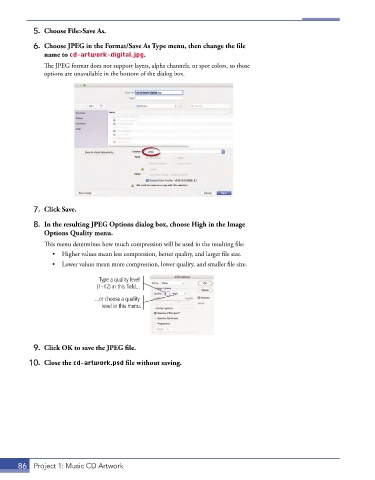
5.  Choose File>Save As.

           6.  Choose JPEG in the Format/Save As Type menu, then change the file
              name to cd-artwork-digital.jpg.
               The JPEG format does not support layers, alpha channels, or spot colors, so those
               options are unavailable in the bottom of the dialog box.


           7.  Click Save.

           8.  In the resulting JPEG Options dialog box, choose High in the Image
              Options Quality menu.
               This menu determines how much compression will be used in the resulting file:
                 •  Higher values mean less compression, better quality, and larger file size.
                 •  Lower values mean more compression, lower quality, and smaller file size.

                               Type a quality level
                               (1–12) in this field...
                              ...or choose a quality
                                level in this menu.


           9.  Click OK to save the JPEG file.

          10.  Close the cd-artwork.psd file without saving.


       86  Project 1: Music CD Artwork

