


Page 73 - Adobe Photoshop CC 2020
P. 73
Save a JPEG File for Digital Media
            The final file required for this project is a 3000 × 3000 pixel, high-quality JPEG file.

              1.  With cd-artwork.psd open and restored to its last-saved state, choose
                 Image>Image Size.

              2.  Choose Pixels in the Width menu.
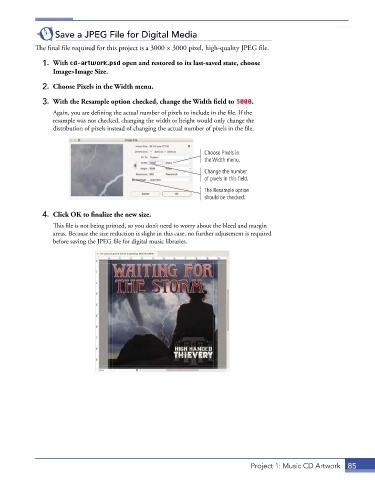
              3.  With the Resample option checked, change the Width field to 3000.

                 Again, you are defining the actual number of pixels to include in the file. If the
                 resample was not checked, changing the width or height would only change the
                 distribution of pixels instead of changing the actual number of pixels in the file.


                                                               Choose Pixels in
                                                               the Width menu.
                                                               Change the number
                                                               of pixels in this field.

                                                               The Resample option
                                                               should be checked.

              4.  Click OK to finalize the new size.
                 This file is not being printed, so you don’t need to worry about the bleed and margin
                 areas. Because the size reduction is slight in this case, no further adjustment is required
                 before saving the JPEG file for digital music libraries.


                                                                              Project 1: Music CD Artwork  85

