


Page 5 - CS6_ID_Look_Inside
P. 5
The Animation Panel in Depth Although you will learn about button events later in this
The Animation panel offers a variety of options for controlling the details of an animation.
project, you should understand that you can also create a
Event(s) defines what event triggers the animation:
INDESIGN FOUNDATIONS • On Page Load, the default, means the animation plays Event is added to the Event(s) menu. InDesign Foundations
button that triggers the animation. In this case, On Button
when the page is opened in the SWF file.
You can click Create Button Trigger to define an existing
• On Page Click triggers when the page is clicked.
object that will trigger the animation. After you click Create
• On Click (Self) and On Roll Over (Self) trigger the
Button Trigger, click the object that you want to trigger the
animation when the object itself is clicked or moused
animation. The clicked object is converted to a button and
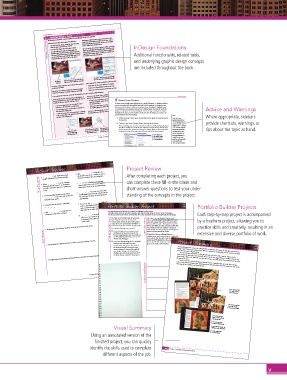
Additional functionality, related tools,
over, respectively. If you choose On Roll Over (Self), you
the Buttons and Forms panel opens.
can also select Reverse On Roll Off, which reverses the
animation when the mouse moves off the object.
and underlying graphic design concepts
are included throughout the book.
The Buttons and Forms panel automatically
Click Create Button Trigger, then click the opens to control the new button’s behavior.
This object is object you want to trigger the animation. Speed controls the change in animation speed over time.
animated.
Duration defines how much time it takes for the animation • Using None, the animation speed is a steady rate.
to play (start to finish). • Using Ease In, the animation speeds up over time.
Play defines the number of times the animation is played. • Using Ease Out, the animation slows down over time.
Check the Loop option to play the animation repeatedly.
If you expand the Properties section of the Animation panel, you can define additional options.
The effect of the Rotate, Scale, and Opacity properties
If you look closely, one end of the motion path includes an depends on which option is selected in the Animate menu:
• If From Current Appearance or To Current Location is
arrow, indicating the direction the object will travel. You can
active, the properties define the ending appearance of EnablE Track changEs
change the direction using the Animate menu:
In many cases, multiple users collaborate on a single document — designers, editors,
the animated object.
• From Current Appearance uses the object’s current • If To Current Appearance is active, the properties define
the starting appearance of the animated object. content providers, and clients all go back and forth throughout the design process.
properties as the animation’s starting point.
Each person in the process will request changes, from changing the highlight color
• To Current Appearance uses the object’s properties as You can use the animation proxy to get a rough idea of Advice and Warnings
in a document to rewriting the copy to fit in a defined space. Because the words in a
the animation’s ending point.
• To Current Location uses the current object’s properties how your properties affect the animation. design are a vital part of communicating the client’s message, tracking text changes
throughout the process can be useful to make sure that all changes are accurate and
as the starting point of the animation and the object’s
approved before the job is finalized.
position as the ending point. 1. With boulevard.indd open, use the Type tool to place the insertion point Note: Where appropriate, sidebars
Some text issues,
in any story. however, have little to
do with typography and provide shortcuts, warnings, or
2. Choose Type>Track Changes>Enable Tracking in All Stories. more to do with “user
The Track Changes feature can be activated to monitor text editing during development. malfunction” — common
This arrow indicates This allows multiple users to edit the text without permanently altering that text until errors introduced by the
The proxy shows the ending that the object will the changes have been reviewed and approved or rejected. (After you have made all the people who created the tips about the topic at hand.
Click here to show rotation and scale defined in move to this position. changes in this stage of the project, you will review and finalize those changes.)
the animation proxy the Animation panel. text (most often, your
clients). Regardless of
on the motion path. 383 These options are how knowledgeable or
Project 6: Digital Layout Variations not available unless careful you are, some
the insertion point
is currently placed. problems will inevitably
creep into the text
elements of your layouts.
3. Open the Track Changes pane of the Preferences dialog box. Make sure the
Added Text, Deleted Text, and Moved Text options are checked.
4. Choose Underline in the Added Text Marking menu.
The Marking options add a visual indicator (strikethrough, underlining, or outlining)
so you can more easily identify text that is affected by the Track Changes function.
Note:
5. Choose Red in the Deleted Text Background menu. Remember, preferences
The Text Color options
Project Review 6. A(n) _______________ is a single line of a highlighting that will Project Review are accessed in the
define the color of
InDesign menu on
Macintosh or in the Edit
identify each type of
menu on Windows.
After completing each project, you
1. _______________ have inside and outside paragraph at the top of a column, or a very change. All three options Note:
default to the same color;
short (one-word) last line of a paragraph.
margins instead of left and right margins.
changing the color for
fi ll in the blank 2. When _______________ is active, InDesign 7. _______________ in the Paragraph Style easier to identify this type It is very easy to
Deleted Text will make it
can complete these fill-in-the-blank and
of change when you review
make a mistake when
Options dialog box can be used to force a
the corrections at the end of
automatically adds pages to accommodate
spellchecking, so it’s a
paragraph to begin in the next linked frame.
an entire story that is placed in a primary text
this stage of the project.
good idea to check the
short-answer questions to test your under-
Include Deleted Text
frame.
65,000 glyphs (characters) in a single font fi le;
option at the bottom of
standing of the concepts in the project.
3. A local formatting override is indicated by 8. _______________ fonts can store more than 6. Click OK to return to the document, then save the file and continue to the When Spellchecking
next exercise.
the same font fi le works on both Macintosh
the Preferences dialog
_______________ next to the style name in the
box.
Paragraph Styles panel. and Windows.
4. A negative fi rst-line indent is called a(n) 9. You can use the _______________ option to 356 Project 6: Digital Layout Variations
create a parent/child relationship between two
_______________. styles, in which changes made to the parent Portfolio Builder Project Portfolio Builder Projects
5. A(n) _______________ is a single line of a style refl ect in the child style as well. Use what you learned in this project to complete the following freeform exercise.
paragraph at the end of a column. 10. _______________ is the process of arranging Carefully read the art director and client comments, then create your own design to meet the needs of the project. Each step-by-step project is accompanied
Use the space below to sketch ideas; when fi nished, write a brief explanation of your reasoning behind your fi nal design.
pages on a press sheet so, when folded
and trimmed, the pages of a job appear in the e client is very pleased with the pieces you ese pieces are exactly what I had in mind.
have designed to promote tourism in the
correct order. national parks. Before she presents the project When I pitch the project to my superiors, I want by a freeform project, allowing you to
to be able to show them all the same pieces for at
to her director for approval, she would like to
least two di erent parks. at way the committee
1. Briefl y explain the difference between facing pages and non-facing pages. art director comments have the same pieces for at least one other park. client comments will see how di erent colors and pictures will a ect practice skills and creativity, resulting in an
the individual pieces, but still have a consistent
To complete this project, you should:
look and feel. I’ve sent you the text and images for
short answer Create one additional layout for a letterfold I’d also like to see one additional layout — extensive and diverse portfolio of work.
Create the yer, rack card, postcard, and
Yosemite for this second set of les.
iPad layouts for Yosemite National Park.
Use the images and text that are provided in
redesigning our park map brochure to include this
the ID6_PB_Project7.zip archive on the
same content, but also with a large map of the
Student Files Web page.
speci c park. We already have the maps, but I’ll
2. Briefl y explain the difference between reader’s spreads and printer’s spreads.
brochure that will include the same
have to nd the les for you; for now just leave Project Summary
content as the other pieces. e inside of
the brochure should have only the park space on the inside of the brochure.
name and space for a map of the park. (If Repurposing the same content in multiple di erent layouts is becoming increasingly common in the
you completed Project 5: Ireland Travel print formats and for digital media.
Brochure, you can use the same basic 4×9″
design world. is project explored two di erent methods for repurposing content, both for multiple
template that you created in that project.) You used unstructured XML to drag speci c types of content into a layout, and you used a
3. Briefl y explain the advantages and disadvantages of nesting text-formatting styles. advantage of the capabilities of digital media.
changes in the text.
more structured approach to automatically place content into tagged frames of a di erent layout. By
maintaining a link to the XML le, you were able to automatically update the placed content to re ect
project justifi cation
You also used the content sharing and alternate layout capabilities that are built into InDesign
CS6 to create di erent layouts from existing content. You also added interactive overlays to take better
271
Project 4: Realtor Collateral Booklet
Use structured XML
to create a layout
from all content
Use unstructured XML
to create a layout
from selected content
481
Use content sharing
tools to create a layout
for digital media
Create an interactive
overlay for digital media
Visual Summary different device orientations.
Create alternate layouts for
Create a digital folio
for tablet display
Using an annotated version of the
finished project, you can quickly
identify the skills used to complete 482 Project 7: National Parks Info Pieces
different aspects of the job.
v

