


Page 19 - Adobe Indesign CC 2020
P. 19
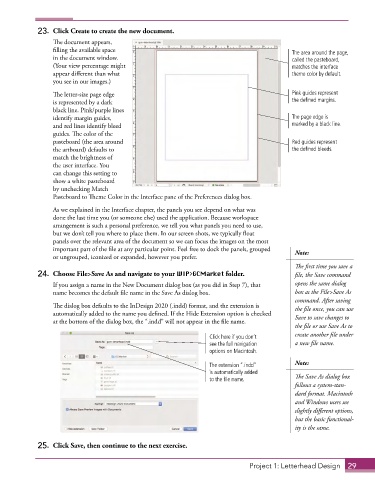
23.  Click Create to create the new document.
                 The document appears,
                 filling the available space                                              The area around the page,
                 in the document window.                                                  called the pasteboard,
                 (Your view percentage might                                              matches the interface
                 appear different than what                                               theme color by default.
                 you see in our images.)
                 The letter-size page edge                                                Pink guides represent
                 is represented by a dark                                                 the defined margins.
                 black line. Pink/purple lines
                 identify margin guides,                                                  The page edge is
                 and red lines identify bleed                                             marked by a black line.
                 guides. The color of the
                 pasteboard (the area around                                              Red guides represent
                 the artboard) defaults to                                                the defined bleeds.
                 match the brightness of
                 the user interface. You
                 can change this setting to
                 show a white pasteboard
                 by unchecking Match
                 Pasteboard to Theme Color in the Interface pane of the Preferences dialog box.
                 As we explained in the Interface chapter, the panels you see depend on what was
                 done the last time you (or someone else) used the application. Because workspace
                 arrangement is such a personal preference, we tell you what panels you need to use,
                 but we don’t tell you where to place them. In our screen shots, we typically float
                 panels over the relevant area of the document so we can focus the images on the most
                 important part of the file at any particular point. Feel free to dock the panels, grouped   Note:
                 or ungrouped, iconized or expanded, however you prefer.
                                                                                           The first time you save a
             24.  Choose File>Save As and navigate to your WIP>GCMarket folder.            file, the Save command

                 If you assign a name in the New Document dialog box (as you did in Step 7), that   opens the same dialog
                 name becomes the default file name in the Save As dialog box.             box as the File>Save As
                                                                                           command. After saving
                 The dialog box defaults to the InDesign 2020 (.indd) format, and the extension is   the file once, you can use
                 automatically added to the name you defined. If the Hide Extension option is checked   Save to save changes to
                 at the bottom of the dialog box, the “.indd” will not appear in the file name.
                                                                                           the file or use Save As to

                                                                 Click here if you don’t   create another file under
                                                                 see the full navigation   a new file name.
                                                                 options on Macintosh.

                                                                 The extension “.indd”     Note:
                                                                 is automatically added
                                                                 to the file name.         The Save As dialog box
                                                                                           follows a system-stan-
                                                                                           dard format. Macintosh
                                                                                           and Windows users see
                                                                                           slightly different options,
                                                                                           but the basic functional-
                                                                                           ity is the same.

             25.  Click Save, then continue to the next exercise.


                                                                             Project 1: Letterhead Design  29

