


Page 18 - Adobe Indesign CC 2020
P. 18
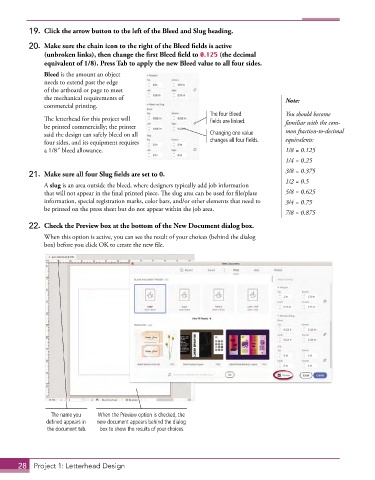
19.  Click the arrow button to the left of the Bleed and Slug heading.

          20.  Make sure the chain icon to the right of the Bleed fields is active
              (unbroken links), then change the first Bleed field to 0.125 (the decimal
              equivalent of 1/8). Press Tab to apply the new Bleed value to all four sides.
               Bleed is the amount an object
               needs to extend past the edge
               of the artboard or page to meet
               the mechanical requirements of                                           Note:
               commercial printing.
                                                                 The four Bleed         You should become
               The letterhead for this project will              fields are linked.     familiar with the com-
               be printed commercially; the printer
               said the design can safely bleed on all           Changing one value     mon fraction-to-decimal
               four sides, and its equipment requires            changes all four fields.  equivalents:
               a 1/8″ bleed allowance.                                                  1/8 = 0.125
                                                                                        1/4 = 0.25
                                                                                        3/8 = 0.375
          21.  Make sure all four Slug fields are set to 0.
                                                                                        1/2 = 0.5
               A slug is an area outside the bleed, where designers typically add job information
               that will not appear in the final printed piece. The slug area can be used for file/plate   5/8 = 0.625
               information, special registration marks, color bars, and/or other elements that need to   3/4 = 0.75
               be printed on the press sheet but do not appear within the job area.
                                                                                        7/8 = 0.875
          22.  Check the Preview box at the bottom of the New Document dialog box.
               When this option is active, you can see the result of your choices (behind the dialog
               box) before you click OK to create the new file.


                 The name you   When the Preview option is checked, the
               defined appears in   new document appears behind the dialog
               the document tab.  box to show the results of your choices.


       28  Project 1: Letterhead Design

