


Page 5 - CS6_AI_Look_Inside.pdf
P. 5
Creating Variable-Width Stroke Profiles Choose the Uniform
Once you have edited the shape of Variable Width option to remove all width Control an art Brush stroke
points from a path.
a path, you can even save your work Profile menu Applying a brush stroke is simple — draw a path (or select an object) and click the
Illustrator FoundatIons other paths. 1. With summit map.ai open, select the two paths that represent the ski lifts.
as a custom stroke profile so you can
apply that same stroke appearance to
brush you want to apply (either in the Brushes panel or in the Control panel menu).
Illustrator Foundations
Once a brush stroke is applied, however, you should also understand how to control it.
If you want to apply the same stroke
shape to more than one path, you can
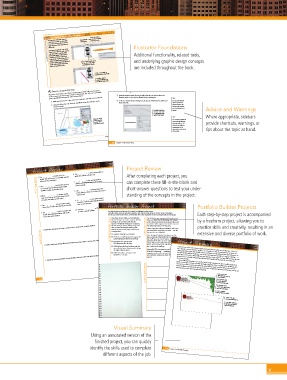
Additional functionality, related tools,
2. Click the Ski Lift brush in the Brushes panel.
save your work as a stroke profile.
The Variable Width Profile menu is
The paths immediately take on the appearance of the brush you created earlier. You
available in both the Control and
created the original darker-line stroke as 5 pt; when you created a brush from the grouped
Stroke panels. Stroke profiles do not
and underlying graphic design concepts
include the initial stroke width; the
profile is applied proportionally based
The width of the path stroke is important when using brushes. When you apply artistic
to save the existing stroke
on the defined width of the stroke
brush strokes, the width of the path’s stroke actually defines the percentage of the brush
modifications as a profile.
are included throughout the book.
where you apply the profile. Click the Add to Profiles button rectangles, you left the Width field (in the Art Brush Options dialog box) at 100%.
width that will be applied. In this case, the width of the path stroke is 1 pt, so the
applied brush stroke is 100% of the brush size. In other words, applying the brush to a
1-pt path results in a brush stroke with a 5-pt width.
Click a saved profile to
apply it to the selected path. The paths appear to be
5-pt wide because you
A profile is applied Click a brush to created the artwork
around a 5-pt path.
proportionally based on apply it to the
the defined stroke width. selected paths.
Create a Custom Pattern
Illustrator CS6 includes a new Pattern Options panel, which makes it very easy to 3. With the brushed path selected, double-click the Ski Lift brush in the
create a custom pattern from any artwork. In this project, you will create a snowflake
pattern that fills the background of the entire artboard.
Brushes panel to open the Art Brush Options dialog box.
1. With summit map.ai open, make sure nothing is selected on the artboard. 4. In the Art Brush Options dialog box, change the Width field to 200% and Note:
2. Using the Selection tool, click the snowflake artwork and drag it to the then click OK. Options of Selected
You can also click the
Swatches panel. Object button at the
bottom of the Brushes
panel to edit the brush Advice and Warnings
The Width field defines options.
the brush stroke width
as a percentage of the
applied stroke weight. Where appropriate, sidebars
Note:
Drag any artwork You could accomplish the
into the Swatches
panel to create a same result by changing provide shortcuts, warnings, or
new pattern swatch. the path stroke to 2 pt.
Every job has different
requirements, so it’s
important to understand tips about the topic at hand.
your options.
Project 4: Ski Resort Map 189
198 Project 4: Ski Resort Map
Project Review 6. The _______________ is the imaginary line on Project Review
which the bottoms of letters rest.
1. The _______________ provide access to 7. _______________ is the spacing between After completing each project, you
handles that you can use to manually resize the
fill in the blank 2. Press _______________ and click the eye icon 8. The _______________ command makes the can complete these fi ll-in-the-blank and
artboard in the workspace.
specific pairs of letters (where the insertion
point is placed).
on a specific layer to switch only that layer
short-answer questions to test your under-
between Preview and Outline mode.
3. When _______________ are active, moving vector shapes of letters accessible to the Direct standing of the concepts in the project.
Selection tool.
your cursor over an unselected object reveals
the paths that make up that object. 9. A _______________ is a special ink used to
reproduce a specific color, typically used for
4. The _______________ tool is used to sample one- or two-color jobs. Portfolio Builder Projects
colors from an object already placed in the file.
to select a specific sublayer.
5. The _______________ is used to monitor and 10. Click the _______________ in the Layers panel Portfolio Builder Project
Use what you learned in this project to complete the following freeform exercise.
change the individual attributes (fill, stroke,
Carefully read the art director and client comments, then create your own design to meet the needs of the project.
etc.) of the selected object. Use the space below to sketch ideas; when finished, write a brief explanation of your reasoning behind your final design. Each step-by-step project is accompanied
Your client, Tracey Dillon, is a local architect.
I’ve decided to open my own architectural services
by a freeform project, allowing you to
She has hired you to create a corporate identity
firm, and I need to start advertising. That means I
services to local land development companies.
an architect will recognize and remember my name.
1. Explain the advantages of using a gradient mesh, compared to a regular gradient. art director comments package so she can begin marketing her client comments need to brand my business so companies who need practice skills and creativity, resulting in an
She has asked you first to develop a logo, and
I’m calling my business TD Associates.
then to create the standard identity pieces
I want a logo that really says ‘architect’, and I want
that she can use for business promotion and
the central color in my logo to be blue — like the
short answer To complete this project, you should: blue you’d see on a blueprint. extensive and diverse portfolio of work.
correspondence.
Once the logo is finished, I need you to use the
logo on business cards, letterhead, and envelopes
o Develop a compelling logo that suggests the
that I will have preprinted; I want a more
agency’s purpose (architectural services).
2. Briefly explain two primary differences between point-type objects and area-type objects.
professional feel than I can create using my laser
o Incorporate the agency’s name
(TD Associates) into the logo.
this for less money if I go 4-color for the letterhead,
o Build the letterhead and envelope with the printer. The printer I spoke with said I could do Project Summary
but 2-color for the envelope.
same technical specs that you used to design Logos are one of the most common types of artwork that you will create in Illustrator. These can
the Apple Organics pieces. Eventually, I’ll be incorporating my logo into
all kinds of advertising — newspaper, local be as simple as text converted to outlines, or as complex as a line drawing based on an object in a
o Build the business card layout to the create whatever versions you think I’ll need for any photograph. Most logos will actually be some combination of drawing and text-based elements. As
3. Explain the potential benefits of using multiple artboards rather than different files for different pieces. purpose. added creative type treatment to build the finished logotype. After completing the initial logo, you
standard 3.5 × 2″ size.
magazines, and even the Internet; I’d like you to you learned throughout this project, one of the most important qualities of a logo is versatility — a
spot-color printing.
good logo can be used in many different types of projects and output in many different types of print
processes. To accomplish this goal, logos should work equally well in grayscale, four-color, and
project justification communication needs as he expands his business. Create a four-color
By completing this project, you worked with complex gradients to draw a realistic apple, then
converted it to other variants that will work with different output processes (two-color and one-
color). Finally, you incorporated the logo artwork into completed stationery to help solve your client’s
layout with the necessary
bleed allowance
174 Use a gradient mesh
to create depth in a
vector-based illustration
Use drawing tools to
create custom logo artwork
based on a photograph
Create a complete
logotype with text outlines
Create a two-color
document without bleeds
Create logo variations as
appropriate for different
print requirements
175
Visual Summary
Using an annotated version of the
fi nished project, you can quickly
identify the skills used to complete 176 Project 3: Identity Package
different aspects of the job.
v

