


Page 28 - Web Combo 2022
P. 28
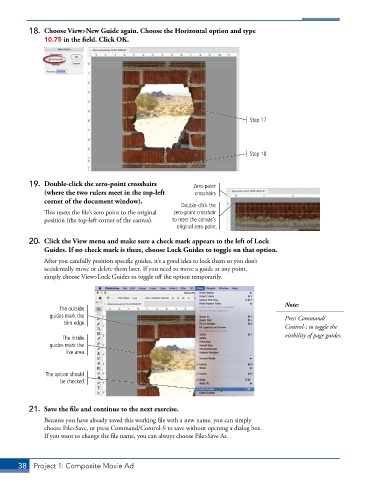
18.  Choose View>New Guide again. Choose the Horizontal option and type
               10.75 in the field. Click OK.


                                                                             Step 17


                                                                             Step 18


          19.  Double-click the zero-point crosshairs       Zero-point
               (where the two rulers meet in the top-left   crosshairs
               corner of the document window).
                                                        Double-click the
               This resets the file’s zero point to the original   zero-point crosshair
               position (the top-left corner of the canvas).  to reset the canvas’s
                                                       original zero point.

          20.  Click the View menu and make sure a check mark appears to the left of Lock
               Guides. If no check mark is there, choose Lock Guides to toggle on that option.
               After you carefully position specific guides, it’s a good idea to lock them so you don’t
               accidentally move or delete them later. If you need to move a guide at any point,
               simply choose View>Lock Guides to toggle off the option temporarily.


                                                                                        Note:
                   The outside
                guides mark the                                                         Press Command/
                     trim edge.
                                                                                        Control-; to toggle the
                                                                                        visibility of page guides.
                    The inside
                guides mark the
                     live area.


               The option should
                   be checked.


          21.  Save the file and continue to the next exercise.
               Because you have already saved this working file with a new name, you can simply
               choose File>Save, or press Command/Control-S to save without opening a dialog box.
               If you want to change the file name, you can always choose File>Save As.


       38  Project 1: Composite Movie Ad

