


Page 49 - Adobe Photoshop 2022
P. 49
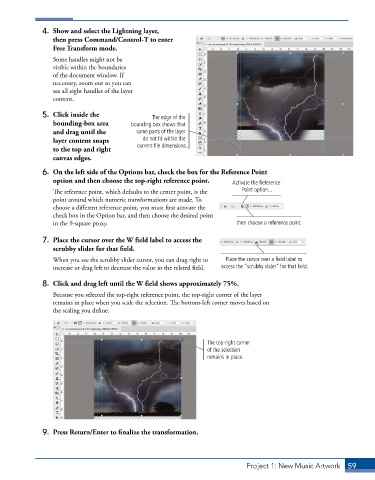
4.  Show and select the Lightning layer,
                 then press Command/Control-T to enter
                 Free Transform mode.
                 Some handles might not be
                 visible within the boundaries
                 of the document window. If
                 necessary, zoom out so you can
                 see all eight handles of the layer
                 content.

              5.  Click inside the             The edge of the
                 bounding-box area       bounding box shows that
                 and drag until the        some parts of the layer
                 layer content snaps         do not fit within the
                 to the top and right      current file dimensions.
                 canvas edges.

              6.  On the left side of the Options bar, check the box for the Reference Point
                 option and then choose the top-right reference point.  Activate the Reference
                 The reference point, which defaults to the center point, is the   Point option...
                 point around which numeric transformations are made. To
                 choose a different reference point, you must first activate the
                 check box in the Option bar, and then choose the desired point
                 in the 9-square proxy.                                  then choose a reference point.

              7.  Place the cursor over the W field label to access the
                 scrubby slider for that field.

                 When you see the scrubby slider cursor, you can drag right to   Place the cursor over a field label to
                 increase or drag left to decrease the value in the related field.  access the “scrubby slider” for that field.

              8.  Click and drag left until the W field shows approximately 75%.
                 Because you selected the top-right reference point, the top-right corner of the layer
                 remains in place when you scale the selection. The bottom-left corner moves based on
                 the scaling you define.


                                                                The top-right corner
                                                                of the selection
                                                                remains in place.


              9.  Press Return/Enter to finalize the transformation.


                                                                            Project 1: New Music Artwork   59

