


Page 48 - Adobe Photoshop 2022
P. 48
Move and Transform Regular Layers
         Smart Object layers enable non-destructive transformations, which means those
         transformations can be changed or undone without affecting the quality of the
         layer content. Transforming a regular layer, on the other hand, is destructive and
         permanent.

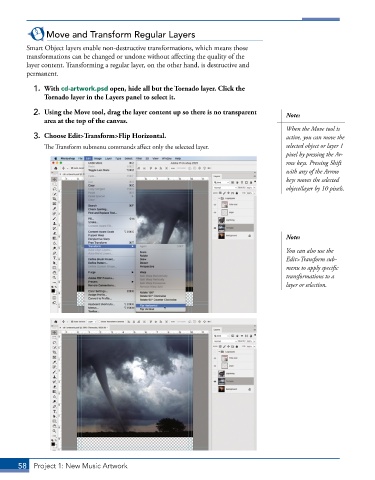
           1.  With cd-artwork.psd open, hide all but the Tornado layer. Click the
              Tornado layer in the Layers panel to select it.
           2.  Using the Move tool, drag the layer content up so there is no transparent   Note:
              area at the top of the canvas.
                                                                                        When the Move tool is
           3.  Choose Edit>Transform>Flip Horizontal.                                   active, you can move the
               The Transform submenu commands affect only the selected layer.           selected object or layer 1
                                                                                        pixel by pressing the Ar-
                                                                                        row keys. Pressing Shift
                                                                                        with any of the Arrow
                                                                                        keys moves the selected
                                                                                        object/layer by 10 pixels.


                                                                                        Note:

                                                                                        You can also use the
                                                                                        Edit>Transform sub-
                                                                                        menu to apply specific
                                                                                        transformations to a
                                                                                        layer or selection.


       58  Project 1: New Music Artwork

