


Page 44 - CC2017_AI_Look_Inside
P. 44
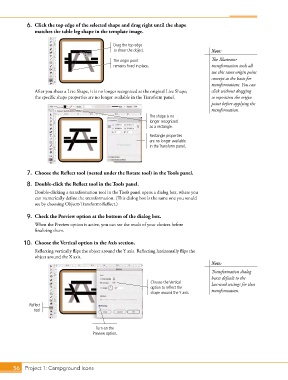
6.  Click the top edge of the selected shape and drag right until the shape
               matches the table leg shape in the template image.


                                                Drag the top edge
                                                to shear the object.                    Note:

                                                The origin point                        The Illustrator
                                                remains fixed in place.                 transformation tools all
                                                                                        use this same origin point
                                                                                        concept as the basis for
                                                                                        transformations. You can

               After you shear a Live Shape, it is no longer recognized as the original Live Shape;   click without dragging
               the specific shape properties are no longer available in the Transform panel.  to reposition the origin
                                                                                        point before applying the
                                                                                        transformation.
                                                               The shape is no
                                                               longer recognized
                                                               as a rectangle.
                                                               Rectangle properties
                                                               are no longer available
                                                               in the Transform panel.


            7.  Choose the Reflect tool (nested under the Rotate tool) in the Tools panel.

            8.  Double-click the Reflect tool in the Tools panel.
               Double-clicking a transformation tool in the Tools panel opens a dialog box, where you
               can numerically define the transformation. (This dialog box is the same one you would
               see by choosing Object>Transform>Reflect.)

            9.  Check the Preview option at the bottom of the dialog box.
               When the Preview option is active, you can see the result of your choices before
               finalizing them.


           10.  Choose the Vertical option in the Axis section.
               Reflecting vertically flips the object around the Y axis. Reflecting horizontally flips the
               object around the X axis.
                                                                                        Note:
                                                                                        Transformation dialog
                                                                                        boxes default to the
                                                               Choose the Vertical      last-used settings for that
                                                               option to reflect the
                                                               shape around the Y axis.  transformation.

             Reflect
               tool


                                         Turn on the
                                       Preview option.


       56 Project 1: Campground Icons

