


Page 19 - Adobe Illustrator 2022
P. 19
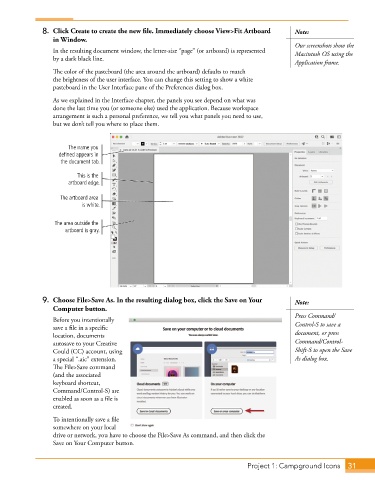
8.  Click Create to create the new file. Immediately choose View>Fit Artboard   Note:
                 in Window.
                                                                                           Our screenshots show the
                 In the resulting document window, the letter-size “page” (or artboard) is represented   Macintosh OS using the
                 by a dark black line.
                                                                                           Application frame.
                 The color of the pasteboard (the area around the artboard) defaults to match
                 the brightness of the user interface. You can change this setting to show a white
                 pasteboard in the User Interface pane of the Preferences dialog box.
                 As we explained in the Interface chapter, the panels you see depend on what was
                 done the last time you (or someone else) used the application. Because workspace
                 arrangement is such a personal preference, we tell you what panels you need to use,
                 but we don’t tell you where to place them.


                      The name you
                   defined appears in
                    the document tab.

                         This is the
                      artboard edge.

                   The artboard area
                          is white.


                  The area outside the
                     artboard is gray.


              9.  Choose File>Save As. In the resulting dialog box, click the Save on Your   Note:
                 Computer button.
                                                                                           Press Command/
                 Before you intentionally
                 save a file in a specific                                                 Control-S to save a
                 location, documents                                                       document, or press
                 autosave to your Creative                                                 Command/Control-
                 Could (CC) account, using                                                 Shift-S to open the Save
                 a special “.aic” extension.                                               As dialog box.
                 The File>Save command
                 (and the associated
                 keyboard shortcut,
                 Command/Control-S) are
                 enabled as soon as a file is
                 created.
                 To intentionally save a file
                 somewhere on your local
                 drive or network, you have to choose the File>Save As command, and then click the
                 Save on Your Computer button.


                                                                             Project 1: Campground Icons   31

