


Page 5 - CS6_DW_Look_Inside
P. 5
The Image Properties Panel in Depth
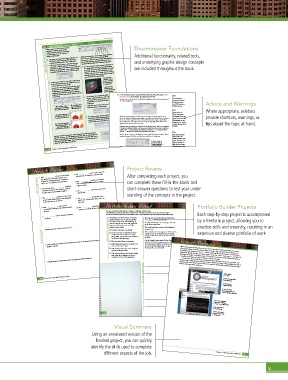
When an image is selected in the document Dreamweaver Foundations
window, the Properties panel not only Although Dreamweaver is not an image-editing application, Additional functionality, related tools,
DREAMWEAVER FOUNDATIONS A. Edit opens the image file in its native application. GIF you can use it to perform some basic image-editing 7. In the Select Image Source dialog box, open the site images folder, select the
displays properties (attributes) of the image,
but also provides access to a number of
F
G
E
C
D
A
B
image-related functions.
functions. These tools can’t replace Adobe Photoshop, but
and JPG files open in Photoshop; PNG files open in
they are well suited for making quick adjustments to an
and underlying graphic design concepts
Fireworks (assuming you have those applications).
image from directly within the Dreamweaver application.
B. Edit Image Settings opens a dialog box where you
D. The Crop tool can be used to remove unwanted areas
can change a variety of options for the selected file
of an image. When you click the Crop tool, the lighter
are included throughout the book.
format. You can also use the Format menu to change the
area shows the area that will be included in the cropped
format of the selected image; if you change the format,
you will be asked where you want to save the new file.
image; you can drag any of the eight handles around
crowe-photography.png file, and click Open/OK.
Return/Enter finalizes the crop; pressing ESC cancels the
crop and restores the original image.
Drag any of the
handles to change
C. Update From Original can be used to make sure an the edge of the crop area to change the area. Pressing If file extensions are
the area that will
hidden on Windows, move
inserted Photoshop image in the HTML file is the most
be included in the
your cursor over a file and
cropped version.
wait a second to see the
If you insert a native Photoshop (PSD) file into a page,
a pop-up window.
Dreamweaver converts it to a file that is appropriate
shows what will
recently saved version of the image. The lighter area fill name and extension in
for Web browsers. The original link to the PSD file is
remain after the crop
maintained; if the PSD file is changed, Dreamweaver
has been applied.
notifies you that the image must be updated to the most
image to exactly match the size of the selected instance
Photography in the Alternate Text field and click OK.
recent version. E. The Resample tool changes the number of pixels in an 8. In the resulting Image Tag Accessibility Attributes dialog box, type Crowe Note:
in the page. This has the same effect as clicking the
The alt attribute is
Text you enter in the Alternate Text field of this dialog box becomes the alt attribute of
Commit Image Size button after resizing an image in the
commonly misnamed
the <img> (image) tag.
Design pane.
an HTML tag but an
When you place a native The actual image in the F. Brightness and Contrast can be used to change the alt tag; it is not Advice and Warnings
attribute of a tag.
page is converted to a
Photoshop file, Dreamweaver Web-friendly format. those properties in a selected image.
stores a link to the original file. Note: Where appropriate, sidebars
If you replace one
This indicator shows that image with another,
the image in the HTML file G. The Sharpen option can be useful for restoring some The alt attribute provides a text alternative to the image, so visitors who use screen the original alt text still provide shortcuts, warnings, or
is the most recent version. detail after resizing/resampling (especially upsizing). readers (or who have disabled image display in their browsers) will be able to understand applies to the new image.
Keep in mind, however, that oversharpening can often
the content of the image. The alt text is also indexed by search engines, which allows
changing the src atribute
The red indicator arrow tells produce worse results than what you start with. them to show your site’s images in the search engine image gallery and make a more Basically, you are only tips about the topic at hand.
qualified determination of your site’s rank.
without affecting the alt
you the Photoshop file has Although most tag attributes are optional, the alt attribute of the <img> tag is required. attribute.
been modified since you
placed it into the HTML file. If an image is simply decorative and does not merit alternate text, you use an empty alt
attribute (alt=""), which satisfies the requirement. (Using alt="" is considered better
than alt=" " because some screen readers pronounce the space.) Note:
Remember: All of the Dreamweaver image-editing tools permanently modify the You can choose <empty> in the dialog box menu to add the empty alt attribute. If you The Long Description
edited file. If you use any of the image-editing buttons, you see a warning that the
changes permanently affect the file (unless someone has checked the Don’t Show ...
simply don’t type in the field, no alt attribute is added to the <img> tag.
field completes the
option in the dialog box). Always keep a backup image so if you over-edit, you can
longdesc attribute of an
Choose <empty> in
replace the backup image and start over.
allow the designer to
the menu to add an
offer a link to a longer
empty alt attribute to image. Its purpose is to
the selected image. description of an image
120 Project 3: Photographer's Web Site on a separate Web page.
Project Review
Project Review 6. The _______________ can be used to fi nd CSS 114 Project 3: Photographer's Web Site
selectors that are related to a specifi c object.
1. A(n) _______________ can be used to change 7. A(n) _______________ fi eld presents options After completing each project, you
the appearance of multiple elements on a
fi ll in the blank 2. You can make a(n) _______________ editable in 8. The _______________ tag creates menus and can complete these fill-in-the-blank and
single page, including elements of different
types, once it is applied to those elements.
from a defi ned list, where users can choose
only one option.
short-answer questions to test your under-
a template to protect the container’s contents
in pages where that template is applied.
selection lists.
3. The _______________ property can be used to 9. The _______________ tag identifi es form standing of the concepts in the project.
prevent other fl oating objects from appearing
objects such as text fi elds, where users can
on the same line as an element. enter text.
4. A(n) _______________ is based on an 10. The _______________ determines the text that Portfolio Builder Projects
appears on a Submit or Reset button. Portfolio Builder Project
unordered list with up to three levels of linked
list items. Use what you learned in this project to complete the following freeform exercise.
Carefully read the art director and client comments, then create your own design to meet the needs of the project. Each step-by-step project is accompanied
5. _______________ in the Code pane identifi es a Use the space below to sketch ideas; when fi nished, write a brief explanation of your reasoning behind your fi nal design.
comment. Everything Green Flowers wants to include a e page structure has already been de ned, but by a freeform project, allowing you to
digital portfolio in the company’s new Web
the images need to be put into place.
site. As part of the team that is building the
Our logo should appear on every page, at the top
new site, your job is to create and implement
e header and footer sections need background
version of the portfolio.
1. Briefl y explain the concept of a class in CSS. art director comments pages for a Flash version and an HTML client comments of the main content area. practice skills and creativity, resulting in an
images placed.
To complete this project, you should:
short answer Create a new site in Dreamweaver using navigation item in the header section. It should extensive and diverse portfolio of work.
We want pink our icon to appear to the left of each
the les that have already been created
change to white when users move the mouse over
(in the DW6_PB_Project3.zip archive on
the links.
the Student Files Web page).
2. Briefl y explain the function of the Preview States menu in the Properties panel when a Spry validation
On the Sample Designs page, add the Flash-based
Place the client’s logo on every page.
the images> owers folder. You will need to modify
footer sections of the page.
the size of the placed ash object on the page to t
widget is selected. Add background images to the header and slideshow. All of the images we want to show are in Project Summary
Add a background image to the navigation the images that we’ve provided. When you prepare the design for a site, you need to determine which images will carry content
links in the header section (they must be placed in the foreground using the <img> tag), and which images will appear in
Add a photo gallery to the Sample Designs disabled the display of images, and search engines to use the content of your pages — is required for
page, using the techniques you used to
the background. Appropriate alt text — which enables visually impaired visitors, users who have
complete the Crowe Photography site. all foreground images. By editing various CSS properties, you have virtually unlimited options for
3. Briefl y explain the signifi cance of the Copy Dependent Files dialog box. without requiring another application.
controlling the background images in di erent sections of a page.
project justifi cation Add a favicon
Dreamweaver also provides image-editing tools that enable you to crop, resize, resample, and
sharpen images. Although these tools do not replace full-featured image-editing applications such as
Photoshop, the Dreamweaver tools enable you to complete simple editing tasks quickly and easily,
268 Project 5: Cupcake Bakery CSS Site Place a Flash animation
to a page
into a Web page
Create a photo
gallery slideshow
Use CSS to define
background colors and
images for different elements
Use CSS to control the
appearance of different
“states” for a navigation link
Place a Flash movie
into a Web page
Resize and resample
146 images to meet layout
requirements
Visual Summary
Using an annotated version of the
finished project, you can quickly
identify the skills used to complete
different aspects of the job. Project 3: Photographer's Web Site 147
v

