


Page 14 - CC2017_DW_Look_Inside
P. 14
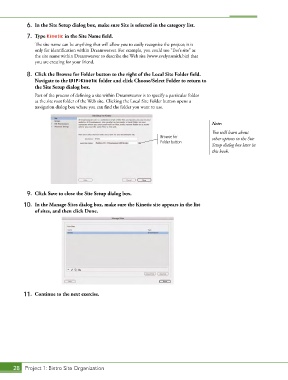
6.  In the Site Setup dialog box, make sure Site is selected in the category list.
            7.  Type Kinetic in the Site Name field.

               The site name can be anything that will allow you to easily recognize the project; it is
               only for identification within Dreamweaver. For example, you could use “Eve’s site” as
               the site name within Dreamweaver to describe the Web site (www.evelynsmith.biz) that
               you are creating for your friend.

            8.  Click the Browse for Folder button to the right of the Local Site Folder field.
               Navigate to the WIP>Kinetic folder and click Choose/Select Folder to return to
               the Site Setup dialog box.
               Part of the process of defining a site within Dreamweaver is to specify a particular folder
               as the site root folder of the Web site. Clicking the Local Site Folder button opens a
               navigation dialog box where you can find the folder you want to use.


                                                                                        Note:
                                                                                        You will learn about
                                                                   Browse for           other options in the Site
                                                                   Folder button
                                                                                        Setup dialog box later in
                                                                                        this book.


            9.  Click Save to close the Site Setup dialog box.

           10.  In the Manage Sites dialog box, make sure the Kinetic site appears in the list
               of sites, and then click Done.


           11.  Continue to the next exercise.


       28 Project 1: Bistro Site Organization

