


Page 29 - Adobe Dream Viewer CC 2020
P. 29
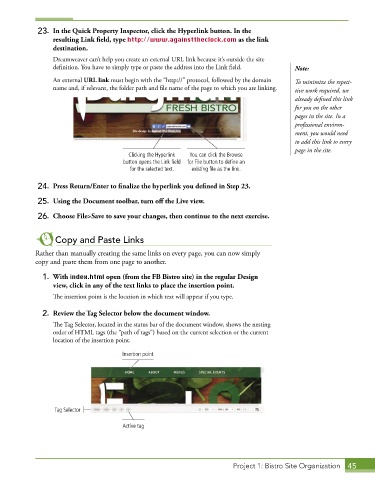
23.  In the Quick Property Inspector, click the Hyperlink button. In the
                 resulting Link field, type http://www.againsttheclock.com as the link
                 destination.
                 Dreamweaver can’t help you create an external URL link because it’s outside the site
                 definition. You have to simply type or paste the address into the Link field.  Note:
                 An external URL link must begin with the “http://” protocol, followed by the domain   To minimize the repeti-
                 name and, if relevant, the folder path and file name of the page to which you are linking.   tive work required, we
                                                                                           already defined this link
                                                                                           for you on the other
                                                                                           pages in the site. In a
                                                                                           professional environ-
                                                                                           ment, you would need
                                                                                           to add this link to every
                                                                                           page in the site.
                                        Clicking the Hyperlink   You can click the Browse
                                       button opens the Link field  for File button to define an
                                         for the selected text.  existing file as the link.

             24.  Press Return/Enter to finalize the hyperlink you defined in Step 23.

             25.  Using the Document toolbar, turn off the Live view.
             26.  Choose File>Save to save your changes, then continue to the next exercise.


                  Copy and Paste Links
            Rather than manually creating the same links on every page, you can now simply
            copy and paste them from one page to another.

              1.  With index.html open (from the FB Bistro site) in the regular Design
                 view, click in any of the text links to place the insertion point.
                 The insertion point is the location in which text will appear if you type.

              2.  Review the Tag Selector below the document window.
                 The Tag Selector, located in the status bar of the document window, shows the nesting
                 order of HTML tags (the “path of tags”) based on the current selection or the current
                 location of the insertion point.

                                      Insertion point


                  Tag Selector

                                      Active tag


                                                                        Project 1: Bistro Site Organization  45

