


Page 42 - Web Combo 2022
P. 42
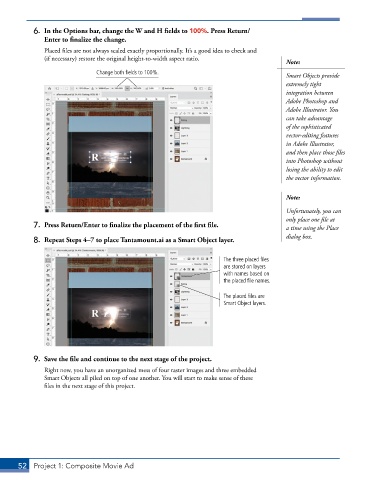
6.  In the Options bar, change the W and H fields to 100%. Press Return/
               Enter to finalize the change.
               Placed files are not always scaled exactly proportionally. It’s a good idea to check and
               (if necessary) restore the original height-to-width aspect ratio.
                                                                                        Note:
                              Change both fields to 100%.
                                                                                        Smart Objects provide
                                                                                        extremely tight
                                                                                        integration between
                                                                                        Adobe Photoshop and
                                                                                        Adobe Illustrator. You
                                                                                        can take advantage
                                                                                        of the sophisticated
                                                                                        vector-editing features
                                                                                        in Adobe Illustrator,
                                                                                        and then place those files
                                                                                        into Photoshop without
                                                                                        losing the ability to edit
                                                                                        the vector information.


                                                                                        Note:
                                                                                        Unfortunately, you can
                                                                                        only place one file at
           7.  Press Return/Enter to finalize the placement of the first file.          a time using the Place
                                                                                        dialog box.
           8.  Repeat Steps 4–7 to place Tantamount.ai as a Smart Object layer.


                                                                     The three placed files
                                                                     are stored on layers
                                                                     with names based on
                                                                     the placed file names.

                                                                     The placed files are
                                                                     Smart Object layers.


           9.  Save the file and continue to the next stage of the project.
               Right now, you have an unorganized mess of four raster images and three embedded
               Smart Objects all piled on top of one another. You will start to make sense of these
               files in the next stage of this project.


       52  Project 1: Composite Movie Ad

