


Page 21 - Web Combo 2022
P. 21
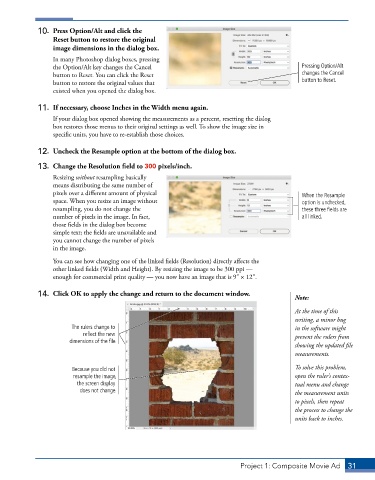
10.  Press Option/Alt and click the
                 Reset button to restore the original
                 image dimensions in the dialog box.
                 In many Photoshop dialog boxes, pressing
                 the Option/Alt key changes the Cancel                                       Pressing Option/Alt
                 button to Reset. You can click the Reset                                    changes the Cancel
                 button to restore the original values that                                  button to Reset.
                 existed when you opened the dialog box.


             11.  If necessary, choose Inches in the Width menu again.
                 If your dialog box opened showing the measurements as a percent, resetting the dialog
                 box restores those menus to their original settings as well. To show the image size in
                 specific units, you have to re-establish those choices.

             12.  Uncheck the Resample option at the bottom of the dialog box.

             13.  Change the Resolution field to 300 pixels/inch.
                 Resizing without resampling basically
                 means distributing the same number of
                 pixels over a different amount of physical                                  When the Resample
                 space. When you resize an image without                                     option is unchecked,
                 resampling, you do not change the                                           these three fields are
                 number of pixels in the image. In fact,                                     all linked.
                 those fields in the dialog box become
                 simple text; the fields are unavailable and
                 you cannot change the number of pixels
                 in the image.

                 You can see how changing one of the linked fields (Resolution) directly affects the
                 other linked fields (Width and Height). By resizing the image to be 300 ppi —
                 enough for commercial print quality — you now have an image that is 93 1 123.

             14.  Click OK to apply the change and return to the document window.
                                                                                           Note:
                                                                                           At the time of this
                                                                                           writing, a minor bug
                       The rulers change to                                                in the software might
                          reflect the new                                                  prevent the rulers from
                      dimensions of the file.
                                                                                           showing the updated file
                                                                                           measurements.

                       Because you did not                                                 To solve this problem,
                       resample the image,                                                 open the ruler’s contex-
                         the screen display                                                tual menu and change
                         does not change.                                                  the measurement units
                                                                                           to pixels, then repeat
                                                                                           the process to change the
                                                                                           units back to inches.


                                                                          Project 1: Composite Movie Ad    31

