


Page 39 - CC 2019 AI Look Inside
P. 39
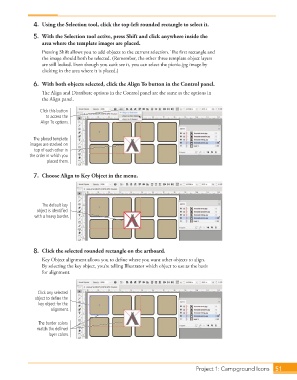
4.  Using the Selection tool, click the top-left rounded rectangle to select it.

              5.  With the Selection tool active, press Shift and click anywhere inside the
                 area where the template images are placed.
                 Pressing Shift allows you to add objects to the current selection. The first rectangle and
                 the image should both be selected. (Remember, the other three template object layers
                 are still locked. Even though you can’t see it, you can select the picnic.jpg image by
                 clicking in the area where it is placed.)

              6.  With both objects selected, click the Align To button in the Control panel.

                 The Align and Distribute options in the Control panel are the same as the options in
                 the Align panel.

                Click this button
                   to access the
                 Align To options.


              The placed template
             images are stacked on
              top of each other in
            the order in which you
                   placed them.


              7.  Choose Align to Key Object in the menu.


                 The default key
               object is identified
              with a heavy border.


              8.  Click the selected rounded rectangle on the artboard.
                 Key Object alignment allows you to define where you want other objects to align.
                 By selecting the key object, you’re telling Illustrator which object to use as the basis
                 for alignment.


                Click any selected
              object to define the
                key object for the
                     alignment.

                The border colors
               match the defined
                    layer colors.


                                                                             Project 1: Campground Icons   51

