


Page 52 - Adobe Illustrator 2022
P. 52
Using the Group Selection Tool

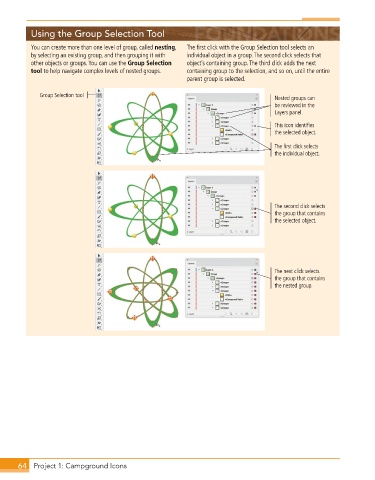
          You can create more than one level of group, called nesting,   The first click with the Group Selection tool selects an
          by selecting an existing group, and then grouping it with   individual object in a group. The second click selects that
          other objects or groups. You can use the Group Selection   object’s containing group. The third click adds the next
          tool to help navigate complex levels of nested groups.   containing group to the selection, and so on, until the entire
                                                          parent group is selected.


             Group Selection tool                                                    Nested groups can
                                                                                     be reviewed in the
                                                                                     Layers panel.
                                                                                     This icon identifies
                                                                                     the selected object.

                                                                                     The first click selects
                                                                                     the individual object.


                                                                                     The second click selects
                                                                                     the group that contains
                                                                                     the selected object.


                                                                                     The next click selects
                                                                                     the group that contains
                                                                                     the nested group.


       64  Project 1: Campground Icons

