


Page 23 - Adobe Illustrator 2021
P. 23
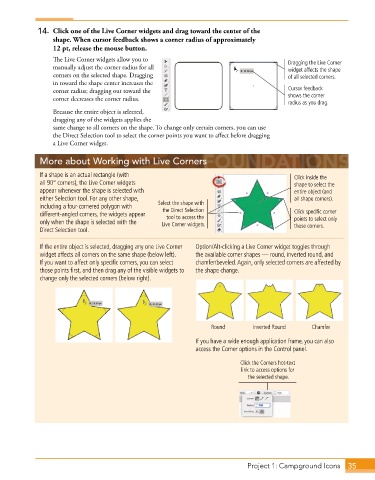
14.  Click one of the Live Corner widgets and drag toward the center of the
                 shape. When cursor feedback shows a corner radius of approximately
                 12 pt, release the mouse button.
                 The Live Corner widgets allow you to                                    Dragging the Live Corner
                 manually adjust the corner radius for all                               widget affects the shape
                 corners on the selected shape. Dragging                                 of all selected corners.
                 in toward the shape center increases the
                 corner radius; dragging out toward the                                  Cursor feedback
                 corner decreases the corner radius.                                     shows the corner
                                                                                         radius as you drag.
                 Because the entire object is selected,
                 dragging any of the widgets applies the
                 same change to all corners on the shape. To change only certain corners, you can use
                 the Direct Selection tool to select the corner points you want to affect before dragging
                 a Live Corner widget.


             More about Working with Live Corners
             If a shape is an actual rectangle (with                                       Click inside the
             all 90° corners), the Live Corner widgets                                     shape to select the
             appear whenever the shape is selected with                                    entire object (and
             either Selection tool . For any other shape,                                  all shape corners).
             including a four-cornered polygon with   Select the shape with
                                                   the Direct Selection
             different-angled corners, the widgets appear   tool to access the             Click specific corner
             only when the shape is selected with the   Live Corner widgets.               points to select only
                                                                                           those corners.
             Direct Selection tool .
             If the entire object is selected, dragging any one Live Corner   Option/Alt-clicking a Live Corner widget toggles through
             widget affects all corners on the same shape (below left) .   the available corner shapes — round, inverted round, and
             If you want to affect only specific corners, you can select   chamfer/beveled . Again, only selected corners are affected by
             those points first, and then drag any of the visible widgets to   the shape change .
             change only the selected corners (below right) .


                                                                 Round        Inverted Round    Chamfer
                                                             If you have a wide enough application frame, you can also
                                                             access the Corner options in the Control panel .
                                                                          Click the Corners hot-text
                                                                           link to access options for
                                                                             the selected shape.


                                                                             Project 1: Campground Icons   35

